
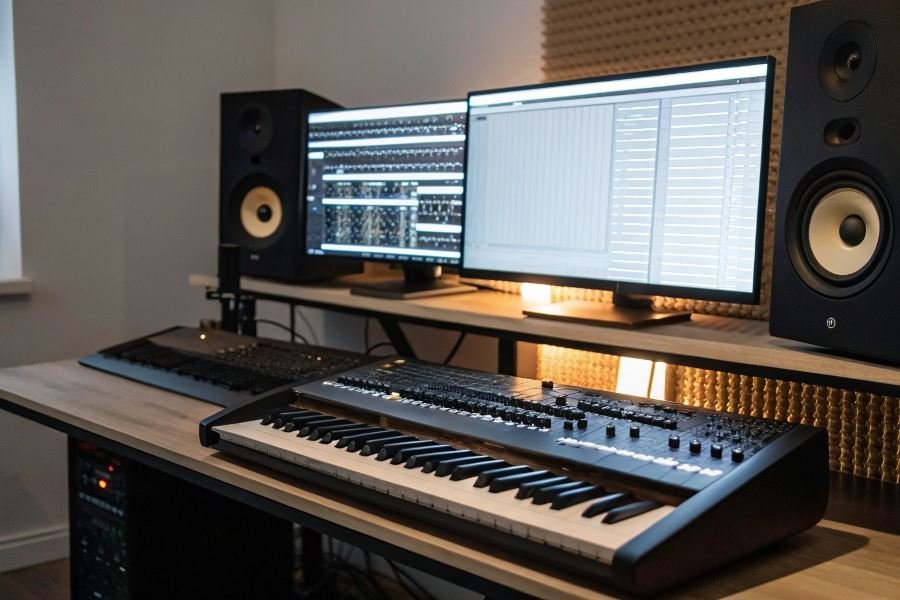
Ever wondered why some home recordings sound professional while others fall flat? The secret isn’t always expensive gear—it’s understanding what truly matters in your setup. For beginner sound engineers, navigating the vast ocean of equipment options can feel overwhelming, especially when working with limited funds.
A sound engineering workstation is more than just a computer with some software. At its core, you need four essential components: a capable computer (your processing hub), an audio interface (your sound’s gateway), monitoring equipment (speakers/headphones that don’t lie to you), and a Digital Audio Workstation (DAW) software. Each component plays a crucial role in your sound quality and workflow efficiency.
But what does “budget” actually mean when building your first studio? In professional audio circles, “budget” is relative—what seems expensive to beginners might be considered entry-level by professionals. For newcomers, expect to invest between $500-1,200 for a complete functional setup that won’t need immediate upgrading. This investment covers your core components while avoiding the frustration of subpar equipment that limits your creative potential.
Setting realistic expectations is crucial. Your first workstation won’t match commercial studios, but it can absolutely produce professional-sounding projects. The key is understanding that limitations often spark creativity—many groundbreaking recordings were created on modest equipment by engineers who mastered their tools completely rather than constantly chasing upgrades.
Core Components for Sound Production Success
Computer Systems That Won’t Break the Bank
The foundation of any audio workstation begins with the right computer. For beginners entering the world of sound engineering, you don’t need a $3,000 powerhouse to create professional-quality audio. A solid mid-range system with at least 16GB RAM, an i5/Ryzen 5 processor (or better), and an SSD for your system and projects will handle most recording and mixing tasks admirably.
Budget workstations for beginner sound engineers should prioritize processing power and memory over fancy graphics cards or ultra-high-resolution displays. The CPU handles real-time audio processing, while RAM determines how many virtual instruments and effects you can run simultaneously. A desktop PC around $700-800 or a laptop in the $900-1100 range will serve you well for years as you develop your skills.
Mac vs. PC debate? Both platforms excel for audio production. Apple Mac Mini systems starting at $599 offer excellent value, while custom-built PCs can deliver more processing power per dollar. The choice often comes down to software preferences and existing ecosystem investments.
Audio Interfaces That Deliver Without Draining Your Wallet
Your audio interface is the critical bridge between the analog and digital worlds. Fortunately, the sub-$300 market has never been more competitive.
The quality difference between budget interfaces today versus five years ago is nothing short of remarkable.
| Interface | Inputs/Outputs | Preamp Quality | Price Range |
|---|---|---|---|
| Focusrite Scarlett 2i2 | 2 in/2 out | Excellent | $160-180 |
| PreSonus AudioBox USB 96 | 2 in/2 out | Very Good | $99-120 |
| MOTU M2 | 2 in/2 out | Outstanding | $170-200 |
| Audient EVO 4 | 2 in/2 out | Excellent | $130-150 |
| Behringer UMC204HD | 2 in/4 out | Good | $80-100 |
The Focusrite Scarlett 2i2 remains the gold standard for beginners, offering clean preamps and rock-solid drivers. However, the MOTU M2 has gained significant traction with its superior audio specifications and built-in metering.
Software That Powers Your Creative Journey
Your Digital Audio Workstation (DAW) will become your creative home. Many professional-grade options offer free trials or affordable entry points:
Top DAW Recommendations for Beginners:
- Reaper – Full-featured with a generous evaluation period ($60 license)
- Ableton Live Intro – Perfect for electronic music production ($99)
- PreSonus Studio One Artist – Intuitive workflow with room to grow ($99)
- Cakewalk by BandLab – Completely free and formerly premium software
- GarageBand – Free for Mac users and surprisingly capable
Beyond your DAW, budget for essential plugins. Many DAWs include quality EQs, compressors, and reverbs, but specialized tools like iZotope Elements Bundle ($99 on sale) can dramatically improve your mixes.
Don’t overlook free plugins from developers like TDR and Analog Obsession that rival paid alternatives costing hundreds.
With these core components in place, you’ll have a workstation capable of producing remarkably professional results without the professional price tag. The technology barrier to entry has never been lower—your creativity and willingness to learn will take you much further than an expensive gear list.
Budget Workstations That Deliver Professional Sound
Finding the right audio production setup when you’re just starting out can feel overwhelming. The good news? You don’t need to empty your bank account to create professional-sounding tracks. Let’s explore three complete workstation configurations that deliver impressive results at different price points.
The Foundation Setup (500−800)
For those taking their first steps into audio production, this entry-level configuration provides everything needed to start creating immediately:
- Computer: Refurbished Dell Optiplex with i5 processor ($300)
- Audio Interface: Focusrite Scarlett Solo ($120)
- Headphones: Audio-Technica ATH-M20x ($50)
- DAW: Reaper ($60) or Cakewalk (free)
- Microphone: Audio-Technica AT2020 ($100)
- Accessories: Basic cables, pop filter, mic stand ($70)
This setup delivers surprisingly capable performance. The Scarlett Solo provides clean preamps with enough headroom for most recording situations, while Reaper offers professional-grade features without subscription fees. The AT2020 microphone has become an industry standard for entry-level condenser mics, delivering clear vocals and instrument recordings.
The foundation setup isn’t about cutting corners—it’s about strategic investment in components that deliver maximum value.
The Versatile Performer (800−1200)
When you’re ready to expand your capabilities without breaking the bank:
- Computer: Mid-tier desktop with i7 processor, 16GB RAM ($500)
- Audio Interface: PreSonus AudioBox 96 ($200)
- Monitors: JBL 305P MkII pair ($300)
- Headphones: Sennheiser HD280 Pro ($100)
- DAW: Studio One Artist ($100)
- Accessories: Acoustic treatment panels, cables, stands ($150)
The jump to studio monitors represents a significant upgrade in this range. The JBL 305P MkIIs provide remarkable clarity and accuracy for their price point. The PreSonus interface/software combination creates a seamless workflow with tight integration between hardware and software.
| Component | Foundation Setup | Versatile Performer |
|---|---|---|
| Inputs | 1 mic, 1 instrument | 2 combo XLR/TRS |
| Monitoring | Headphones only | Monitors + Headphones |
| Processing Power | Basic | Moderate |
| Recording Capability | 2 tracks simultaneously | 4+ tracks simultaneously |
The Growth-Ready Rig (1200−1500)
This configuration provides room to grow without requiring a complete overhaul later:
- Computer: Performance desktop with i9 or Ryzen 7, 32GB RAM ($700)
- Audio Interface: Universal Audio Volt 276 ($400)
- Monitors: Kali Audio LP-6 pair ($300)
- Headphones: Beyerdynamic DT 770 Pro ($150)
- DAW: Ableton Live Standard ($350 on sale)
- Accessories: Comprehensive acoustic treatment, quality cables ($200)
The UA Volt brings legendary analog circuitry to the budget space, with vintage-inspired compression that adds character to recordings. The Kali monitors deliver near-field accuracy that rivals monitors twice their price. This setup handles demanding projects with multiple virtual instruments and effects without breaking a sweat.
What makes this configuration truly future-proof is the expandability—you can add outboard gear, additional microphones, and controllers without needing to replace your core components.
Each of these workstations represents a thoughtful balance between performance and price, ensuring that your creative journey isn’t hampered by technical limitations or unnecessary expenses.
Discover the top 5 budget-friendly workstations perfect for beginner sound engineers. Compare essential components, affordable audio interfaces under $300, and complete setups ranging from $500-$1500 to launch your audio production journey.
Discover the top 5 budget-friendly workstations perfect for beginner sound engineers. Compare essential components, affordable audio interfaces under $300, and complete setups ranging from $500-$1500 to launch your audio production journey.